
You Are Trading Blind. Here Is Why.
Every single day in crypto futures and perpetual swaps markets, billions of dollars in leveraged positions sit waiting to be closed. Not by choice, by force. When price hits a trader's liquidation price, the exchange's risk engine automatically closes the entire position. No negotiation. No second chances. Just an algorithmic market order dumping into the book.
Now imagine many forced closures being triggered around the same price area. That is a liquidation cluster, a zone where concentrated leverage may add forced buying or selling to an already moving market. The resulting path still depends on liquidity, order flow, volatility, and changing positions.
Here is the problem: you cannot see these clusters on a normal chart. Candlesticks show you where price has been. Order books show you current bids and asks (which are often spoofed). Neither one shows you where the actual fuel is sitting.
Kingfisher's Liquidation Maps (LiqMaps) use a proprietary engine, developed and refined since 2020, to visualize model-estimated zones of liquidation pressure. They do not expose exact exchange orders and should be read as market context, not predictions.
This guide assumes zero prior knowledge. We start from absolute basics and build up to actual trade setups you can use today. How to Stop Getting Liquidated Before Major Moves walks through this in more detail. See where forced selling sits right now on the live Ethereum liquidation heatmap.
What Is a Liquidation Map? (The Plain English Version)
A liquidation map is a chart that organizes model-estimated liquidation pressure into clusters at specific price areas. It cannot show every private position or account-level liquidation price across the futures market.
Think of it like this:
Imagine a room full of people holding buckets of water. Each person has been told: "If someone says the magic number, dump your bucket." Some people have tiny cups. Some have massive barrels. A LiqMap does not count every bucket; it estimates which price areas may contain more or less concentrated pressure relative to the current view.
An area with stronger displayed intensity deserves closer observation than a quieter area in the same view. Neither one tells you exactly what will happen if price reaches it.
Your job as a trader is to compare those estimated zones with current price, market context, and your own risk limits. For a fuller treatment, Getting Started with The Kingfisher: A Responsible Liquidation Map Workflow covers the whole workflow.
How to Read a LiqMap: Axis by Axis
The X-Axis (Horizontal) = Price
Simple. Each point along the horizontal axis represents a specific price level. On a $BTC LiqMap covering $90,000-$100,000, the left side shows $90K levels and the right side shows $100K levels. Current price is usually marked with a vertical line or indicator.
The Y-Axis (Vertical) = Relative Cluster Strength
This is where beginners get confused, so pay attention.
The vertical axis does NOT show dollar amounts, a position count, or a probability. It shows displayed relative intensity produced by Kingfisher's proprietary engine.
Read it comparatively: Which estimated zones stand out within the same asset, view, timeframe, and settings?
- Compare bar height or visual intensity only inside a like-for-like view.
- A more prominent area is a stronger model output in that view, not a promised market reaction.
- If the asset, timeframe, filters, or data refresh changes, reassess the whole display.
The key insight: Relative intensity helps prioritize what to inspect. It is not a direct measure of market impact, a cash amount, or a forecast.
Why Display Relative Intensity Instead of a Raw Dollar Claim?
Raw dollar claims can imply precision that public market data does not provide. Exchanges do not publish a complete, continuously updated ledger of every account's position, collateral, margin mode, and liquidation price.
The proprietary LiqMap engine turns available market information into an estimated relative view while keeping its private inputs, weightings, and transformations confidential. Use the displayed hierarchy to compare zones, then cross-check it with the chart legend, price action, liquidity, order flow, and risk controls.
Understanding Colors on LiqMaps
This is the #1 misconception among new LiqMap users, so let me be crystal clear:
Colors on liquidation maps distinguish between different clusters. They do NOT indicate direction (bullish/bearish).
If you see a blue cluster next to an orange cluster, that means "these are two separate concentration zones." Blue is not bullish. Orange is not bearish. They are just labels.
For directional information, use LiqRatios (available alongside LiqMaps on Kingfisher). LiqRatios show the sum of long versus short liquidations at each price level WITH red/green coloring indicating directional bias:
- Red = net long liquidations at this level (price pushed down by long liquidations)
- Green = net short liquidations at this level (price pushed up by short liquidations)
Beginner tip: Start by looking at LiqMap (the cluster locations) and LiqRatio (the direction) together. Using only one gives you half the picture.
The Different Leverage Views Explained
Kingfisher offers multiple LiqMap views filtered by leverage tier. Each view tells a different story because different types of traders use different leverage levels:
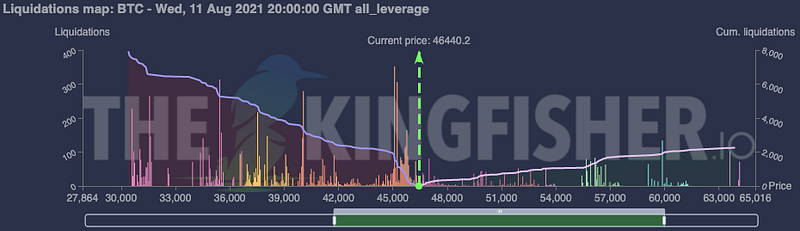
All Leverage View
The complete picture. Every liquidation from 1x leverage degenerates up to 125x maniacs, all combined into one map. This is your default starting point for any analysis.
When to use: General market overview, swing trade planning, identifying the biggest overall clusters.
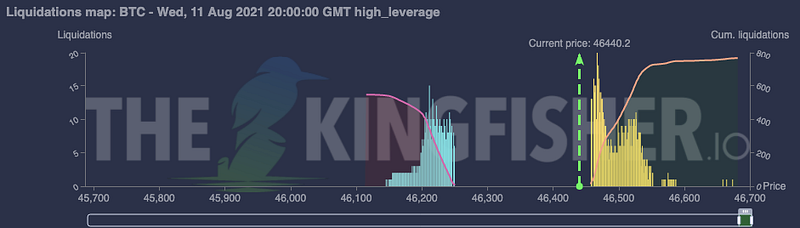
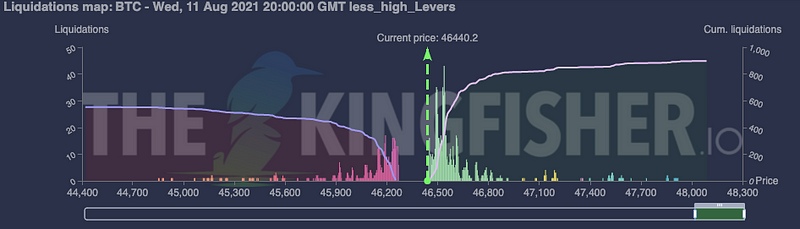
High Leverage View (10x - 125x)
High-leverage positions can change quickly, so nearby estimated clusters may appear, move, or fade as new inputs arrive. Treat this view as short-horizon context rather than a reaction forecast.
When to use: Short-horizon scalping and intraday context when monitoring nearby model-estimated zones. Refresh and verify the view because high-leverage positions can change quickly.
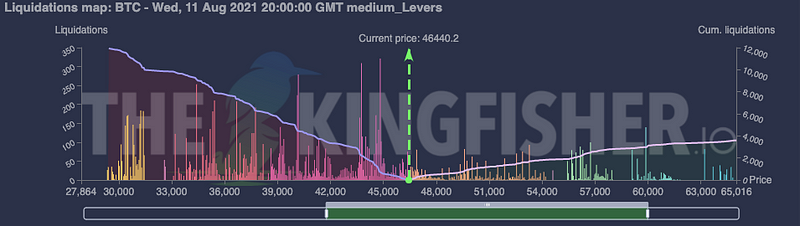
Medium Leverage View (3x - 10x)
This view isolates a different leverage slice from the high-leverage view. Its estimated clusters may persist differently as market inputs change, but persistence does not make an area a reliable target.
When to use: Comparing day-trading context across consistent timeframes while validating any thesis with price structure, liquidity, and independent risk controls.
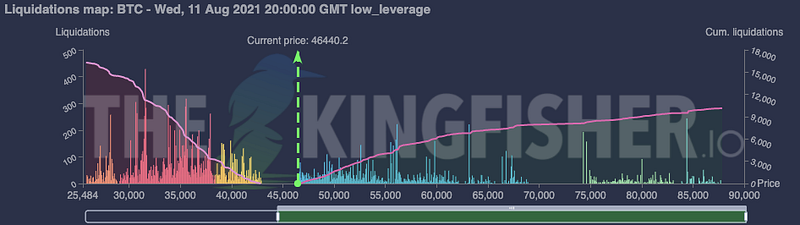
Low Leverage View (1x - 3x)
This view focuses on lower-leverage model assumptions. Its estimated zones may sit farther from current price, but they do not identify specific institutions or guarantee a trend-level move.
When to use: Swing and position-trading context, especially when comparing distant estimated zones with broader volatility and market structure.
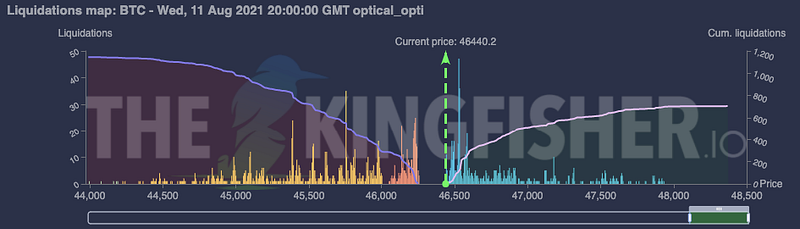
Optical Optimized View
An experimental view that mimics camera auto-focus mechanics. It visually prioritizes nearby model-estimated zones while de-emphasizing distant areas. Think of it as a faster way to inspect the current view, not a probability filter.
When to use: Quick scans before scalping sessions when you need fast answers, not comprehensive analysis.
What Do Clusters Mean for Price?
Three reading disciplines keep the map useful without turning an estimate into a forecast:
Pattern 1: Treat Relative Intensity as Context, Not Attraction
A prominent cluster means the proprietary model currently assigns more relative intensity to that area than to quieter areas in the same view. It does not mean price is compelled to travel there.
Why: Price direction and timing depend on many forces that LiqMap does not claim to predict. Use clusters to frame questions, then check whether price structure, liquidity, flow, volatility, and event risk support or invalidate the idea.
Pattern 2: Not Every Cluster Gets Swept
This is the trap that burns new LiqMap users. You see a visually prominent cluster away from current price and assume "price will go there."
It might. It might not. The estimate can remain untouched, change, or disappear as positions and market inputs evolve. Distance and recent volatility matter, but neither creates a target.
Practical rule: Compare a zone's distance with recent volatility and your timeframe. Do not convert proximity into an automatic entry, target, or confidence threshold.
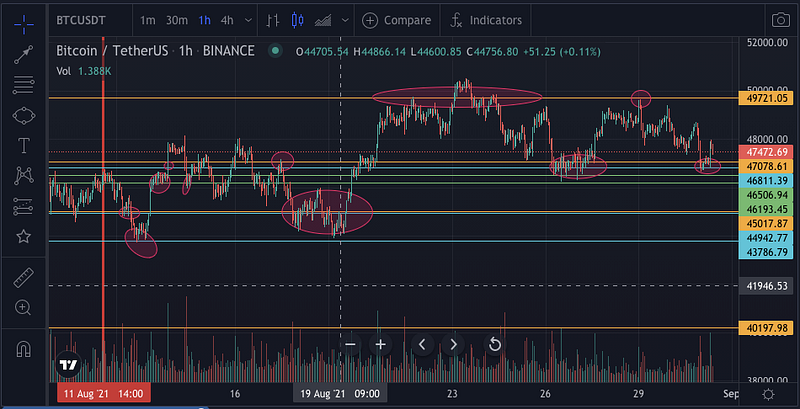
Pattern 3: A Swept Zone Does Not Confirm a Reversal
When price trades through an estimated cluster, several outcomes remain possible: continuation, rejection, consolidation, or a revised model output. The map alone cannot establish that a cascade is complete or that positioning has been exhausted.
Risk implication: Decide exits and invalidation from your own plan and observed market structure. A displayed zone can inform that review, but it cannot choose the correct action for you.
Basic Observation Frameworks Around Clusters
Setup 1: The Cluster Bounce (Beginner-Friendly)
Concept: Observe how price behaves as it approaches an estimated cluster without assuming that the area will cause a bounce.
Conditions:
- LiqMap shows a visually clear, current cluster relevant to your timeframe
- Price is approaching the cluster (not already at it)
- No larger opposing cluster between price and target
- LiqRatio and independent flow data add context without guaranteeing direction
Plan: Define in advance what observed price behavior would support or invalidate the hypothesis. Risk: Size the position and maximum loss independently of the map. Review: Note whether the zone persists after a fresh data update.
Example: As price approaches a visually prominent zone, observe whether the estimate persists and whether price structure and flow agree. Do not assume a bounce from intensity alone.
Setup 2: The Cluster Sweep (Intermediate)
Concept: Price has momentum toward an estimated cluster, creating a scenario to monitor rather than a promised sweep.
Conditions:
- A current, visually prominent cluster lies in the direction of momentum
- TOF (Toxic Order Flow) showing informed activity in sweep direction
- CVD confirming buying/selling pressure alignment
- The zone remains prominent when the same view is refreshed
Plan: Require observable confirmation from price and flow before acting. Risk: Place invalidation from market structure and account risk, not from displayed intensity. Review: Record what happened without treating one example as validation of the model.
Example: If momentum and flow point toward a prominent estimated zone, monitor whether both persist. A weakening zone or conflicting flow invalidates the observation rather than predicting a sweep.
Setup 3: The Range Fade (Two Clusters Defining Range)
Concept: When clusters exist both above AND below current price, they can frame a two-sided scenario. They do not define a mechanical range.
Conditions:
- Clear long cluster below price (support zone)
- Clear short cluster above price (resistance zone)
- Price currently between the two clusters
- The two zones show broadly comparable displayed intensity in the same view
Plan: Observe which side price tests and whether independent market data confirms acceptance or rejection. Direction: Do not infer long or short direction from color or relative intensity alone. Target: Define objectives from market structure rather than treating either cluster as mandatory. Risk: Set invalidation and loss limits before acting.
Common Beginner Mistakes (And How to Avoid Them)
Mistake 1: Trading Every Cluster You See
Not every bar on the LiqMap deserves a position. Filter by context:
- Compare displayed intensity only within the same view and settings.
- Check whether the zone's distance is relevant to your timeframe and recent volatility.
- If LiqMap is the only supporting observation, wait for independent price, liquidity, or flow context.
Quality over quantity. A smaller set of documented, risk-defined observations is more useful than acting on every cluster.
Mistake 2: Confusing Cluster Direction
Remember: colors on LiqMap do NOT indicate direction. A tall blue cluster is not "bullish." It is just a concentration zone. Use LiqRatio for direction, or cross-reference with CVD and TOF.
I have seen traders go long into massive long clusters (which would dump price if swept) because they thought the color meant something it did not. Do not be that trader.
Mistake 3: Using Stale Maps
Liquidation maps are snapshots. Positions open and close constantly. The map you pulled this morning might be irrelevant by this afternoon.
Best practice: Pull a fresh map before every significant trade decision. For active day trading, refresh every 1-2 hours. Premium users get real-time cluster updates.
Mistake 4: Ignoring Timeframe Context
A cluster that looks huge on a 1-hour LiqMap might be invisible on a daily LiqMap (because it formed and dissolved within hours). Match your map timeframe to your trading timeframe:
- Scalpers: Focus on High Leverage view, refresh often
- Day traders: Medium + High Leverage views, refresh every few hours
- Swing traders: All Leverage + Low Leverage views, daily refreshes
Your First 10 Minutes With a LiqMap
Ready to try this yourself? Here is exactly what to do:
Minute 1-2: Go to thekingfisher.io, select $BTC, and generate a liquidation map using "Last." Just look at it. Notice the bars. Notice where current price sits relative to clusters.
Minute 3-4: Identify the most visually prominent clusters. Note their price ranges and compare their displayed intensity within this view.
Minute 5-6: Switch to LiqRatio view. Note which direction each of those 3 clusters leans (red = long liqs dominate, green = short liqs dominate).
Minute 7-8: Ask yourself: "Which estimated zone is nearest, and what evidence would support or invalidate its relevance?"
Minute 9-10: Check TOF and CVD on the same pair. Does flow data support the same market hypothesis? You now have a documented observation to validate, not a standalone signal.
It is simple to start: read relative intensity, preserve the view's context, and cross-check every hypothesis. The depth comes from disciplined observation and risk management, not from treating estimated zones as certain outcomes.
Related reading: Once you have mastered LiqMap fundamentals, level up with our complete scalping toolbox guide, understand the origin story in why heatmaps changed everything, or explore CVD strategies for volume confirmation techniques. For the full modern guide with GEX+ and TOF integration, read liquidation maps 2026. To understand how exhaustion candles form at these cluster levels, check our reversal pattern guide. If you are new to reading charts, start with how to read crypto charts. Ready to start reading live maps? View Kingfisher pricing or see all features.
Related Articles
- Liquidation Maps 2026: Complete Guide to Crypto Liquidation Heatmaps
- The Kingfisher Scalping Toolbox: Complete Guide to Scalping Crypto Perps
- CVD + LiqMap Trading: Volume Delta Strategies for Liquidation Maps
- How to Read Crypto Charts: The Complete Beginner's Guide
FAQ
Q: I've never looked at a liquidation map before. What am I looking at? A: You are looking at model-estimated zones of liquidation pressure produced by Kingfisher's proprietary engine. Position, color, and displayed relative intensity help you compare areas in the current view. They are not exact account positions, exchange orders, cash amounts, probabilities, or guaranteed future transactions.
Q: Why do liquidation clusters form at specific price levels instead of being randomly distributed? A: Positioning can concentrate around commonly watched areas, but private account details are not fully observable and positions change continuously. LiqMap estimates where pressure may be concentrated; it does not claim that every displayed cluster is real, stable, or destined to be reached.
Q: How do I read relative intensity, and does it make a cluster tradeable? A: Read relative intensity only by comparing zones inside the same asset, timeframe, view, and settings. A more prominent area deserves attention, but no displayed intensity makes a cluster automatically tradeable. Confirm relevance with fresh data, price structure, liquidity, flow, volatility, and a predefined risk plan.
Q: What's the LiqRatio view and why does it matter? A: LiqRatio adds an estimated view of long-versus-short liquidation balance around a cluster. Use it as supporting context, not as proof of support, resistance, direction, or the type of move that will follow. Compare it with current price structure, liquidity, TOF, CVD, and your risk plan.
Q: What's the realistic timeline for going from "complete beginner" to "comfortably reading LiqMaps for trade decisions"? A: There is no universal timeline or performance outcome. First learn the legend, relative intensity, view settings, and LiqRatio. Then practise documenting what the map displayed, what independent context showed, and what would invalidate the idea. Use paper trading or replay before risking capital, and judge your process over a meaningful sample rather than expecting LiqMap alone to improve results.
The map does not guarantee treasure. But walking blind guarantees you will never find it.