
Everyone Trades the Same Instruments. You Do Not Have To.
Walk into any crypto trading Discord or Twitter feed and you will see the same dozen pairs discussed endlessly: $BTC perp, $ETH perp, maybe SOL, AVAX, LINK if people are feeling adventurous. Thousands of traders crowding the same trades, fighting for the same liquidity, providing the same fuel to the same market makers.
What if you could trade something nobody else is trading? Something custom-built to match your thesis, your risk tolerance, and your view of the market?
That is exactly what the Kingfisher KF Index tool lets you do. Create composite indexes from any combination of crypto assets across any supported exchange. Long some, short others. Weight them however you want. Then execute the entire basket as a single trade with one click.
This guide walks through everything: what composite indexes are, why they matter, how to build them, how to trade them, and how to use advanced tools like BetaPlay to find ideas worth indexing.
What Is a Composite Crypto Index?
A composite index is a custom instrument made up of multiple underlying assets, each assigned a specific weight (positive for long positions, negative for short positions). The index value moves based on the weighted performance of all its components. This approach is popular among traders who use arbitrage and statistical strategies.
Simple example: You create an index that is:
- 60% long $BTC
- 30% long $ETH
- 10% short SOL
If $BTC rises 5%, $ETH rises 3%, and SOL rises 8%, your index value changes by: (0.60 x 5%) + (0.30 x 3%) + (-0.10 x 8%) = 3% + 0.9% - 0.8% = +3.1%
You just traded a custom view: "BTC and ETH outperform, SOL underperforms." No existing instrument offers that exact exposure. Your index does.
Why Trade Custom Indexes? The Edge That Most Traders Miss
Reason 1: Express Complex Theses in One Trade
Most trading ideas are not "BTC goes up." They are more nuanced: "BTC outperforms ETH while altcoins bleed," or "Layer 1s rally while DeFi tokens dump," or "the market is risk-on but I want to hedge tail risk with a short volatility proxy."
Custom indexes let you express these multi-dimensional theses as single positions. One entry, one exit, one P&L that reflects your actual view.
Reason 2: Access Statistical Arbitrage Opportunities
By combining longs and shorts in calculated ratios, you can create indexes with statistical properties that individual assets do not have:
- Mean-reverting indexes: Combine positively correlated assets with offsetting weights so the index naturally oscillates around a mean value. Trade the oscillations.
- Beta-neutral indexes: Long and short weights calibrated so the index has zero market beta (no directional exposure to BTC). Profit from relative performance, not market direction.
- Momentum indexes: Weight assets by recent performance (long winners, short losers) to create a systematic momentum strategy that rebalances automatically.
Reason 3: Reduce Single-Asset Risk
Holding all your capital in one perp position is concentrated risk. A single news event, exchange issue, or liquidation cascade can devastate a single-position account. A diversified index spreads risk across multiple assets while maintaining your directional or relative-value thesis.
Reason 4: Trade Views That Have No Liquid Instrument
You think "DeFi blue chips will outperform Layer 1s over the next two weeks." There is no "DEFI vs L1" perpetual futures contract anywhere. But you can CREATE one as a KF Index: long UNI, long AAVE, long MKR, short ETH, short SOL. Execute it. Manage it. Close it when the thesis plays out.
Building Your First Custom Index: Step by Step
Step 1: Open the KF Index Manager
Navigate to the KF Index section of thekingfisher.io. Click "Manage Indexes" to access the index creation and management interface.

Open the KF-Index manager then "manage indexes"
Step 2: Create a New Index
Click "New Index." Select your base exchange:
- Binance: Largest selection of perp pairs, deepest liquidity
- Bybit: Clean perp-focused data, competitive fees
- "All": View instruments available across every supported exchange
For most users, starting with Binance gives you the widest selection of components.

Click "new index"
Step 3: Select Components and Assign Weights
From the dropdown menus, select each asset you want in your index and assign its weight:
- Positive number (+): Long position (you profit when this asset rises)
- Negative number (-): Short position (you profit when this asset falls)
- Weight magnitude: Determines size allocation (2.0 = double weight, 0.5 = half weight)
Weighting tips:
- Weights do not need to sum to 1.0 or 100%. They are relative proportions.
- Keep total absolute weight reasonable (sum of absolute values between 1.0 and 3.0 for balanced indexes).
- Avoid extreme weights (above 5.0 on a single component) unless you have strong conviction. They concentrate risk.
- Negative weights for hedging should typically be smaller than core long weights (a hedge, not a second bet).

Select the instruments and weights
Step 4: Save and Preview
Click "Save." Your new index appears in your index list. Click it to preview how the index would have performed historically based on current component weights. This backtest-like view helps validate whether your thesis makes sense before risking capital.
Executing an Index Trade
Connecting Your Exchange API
Before trading indexes, connect your exchange API keys:
- Navigate to API Instance management in Kingfisher
- Generate API keys on your exchange (Binance, Bybit, etc.) with trading permissions enabled
- Paste keys into Kingfisher (encrypted storage, never shared)
- Test connection to confirm live data flow
Security note: Kingfisher only requires trading permissions (not withdrawal permissions). Never grant withdrawal access to any third-party tool.

Connect your existing API keys, or add an "API Instance"
Placing the Trade
With your index created and API connected:
- Select your index from the manager
- Enter your total trade size (in USD or base currency equivalent)
- Choose direction: Long the index or Short the index
- Click execute
What happens behind the scenes: Kingfisher calculates the position size for each component based on your total size and the index weights. It then places market orders (or limit orders, depending on your configuration) for each component across the connected exchange(s).
Example: You enter a $10,000 long trade on an index weighted 60% BTC / 30% ETH / -10% SOL:
- $6,000 worth of BTC-PERP long executed
- $3,000 worth of ETH-PERP long executed
- $1,000 worth of SOL-PERP short executed
All three legs fill (subject to exchange liquidity and minimum order sizes). Your combined position now tracks the index performance.
Managing Open Positions
After execution:
- View positions in the panel below the chart (individual legs shown with real-time P&L)
- Close positions by checking the box next to each leg and clicking the green confirmation tick
- Force refresh positions using the refresh button (yellow icon) if data seems stale
- Partial closes are supported, close individual legs independently if your thesis changes for specific components

Track your open positions under the chart
Important Execution Notes
Minimum order sizes vary by exchange and instrument. If your calculated leg size falls below an exchange's minimum, Kingfisher adjusts proportionally. This can cause slight weight discrepancies between intended and actual index composition. Always verify fills after execution.
All index orders execute as market orders by default. Be aware of spread costs, especially on thinner components. For large index trades ($50K+), consider executing in multiple smaller slices to reduce market impact.
Existing exchange positions interact with index trades. If you already hold a personal long BTC position on Binance, and your index includes a long BTC leg, the positions stack. KF executes "over" your existing positions. Track your NET exposure carefully.
Advanced Index Strategies
Strategy 1: The "BTC Dominance Fade"
Thesis: When BTC dominance gets extreme (everyone piled into BTC, alts abandoned), alts tend to outperform as capital rotates.
Index construction:
- Short $BTC (weight: -1.0)
- Long equal-weight basket of top 5-10 alts by market cap (each weight: +0.1 to +0.2)
Entry signal: BTC dominance above 55-58% (extreme territory) Exit signal: BTC dominance normalizes below 52% Risk note: This is a contrarian bet against the market's favorite asset. Size accordingly.
Strategy 2: The "L1 vs DeFi Rotation"
Thesis: Capital rotates between narrative categories. Capture the rotation rather than predicting direction.
Index construction:
- Long Layer 1s: ETH (+0.3), SOL (+0.2), AVAX (+0.1)
- Short DeFi blue chips: UNI (-0.2), AAVE (-0.2), MKR (-0.1)
Entry signal: DeFi tokens showing relative strength vs L1s (DeFi outperforming) Exit signal: Rotation reverses (L1s regaining leadership) Rebalance: Weekly or when relative performance exceeds 10%
Strategy 3: The "Volatility Risk Premium" Index
Thesis: High-volatility alts tend to mean-revert more aggressively than BTC. Create an index that systematically sells volatility spikes.
Index construction:
- Long stablecoins/stable pairs (weight: +0.5), baseline
- Short high-volatility alts during spike extremes (weights: -0.15 to -0.25 each, 2-4 components)
- Rebalance weekly based on realized volatility rankings
Entry signal: Selected alts show >100% 30-day realized volatility (extreme) Exit signal: Volatility compresses below 60% 30-day RV Risk note: Shorting volatile alts is dangerous. Use small size and strict stops.
BetaPlay: Supercharging Your Index Ideas
BetaPlay is a powerful community tool available through the Kingfisher Bazar that extends KF Index capabilities with screening, visualization, and flow analysis features.

Get BetaPlay in the KF Bazar
What BetaPlay Adds
Markets Screener: Quickly add/remove instruments from your analysis canvas. Filter by volume, 24-hour change, or open interest metrics.
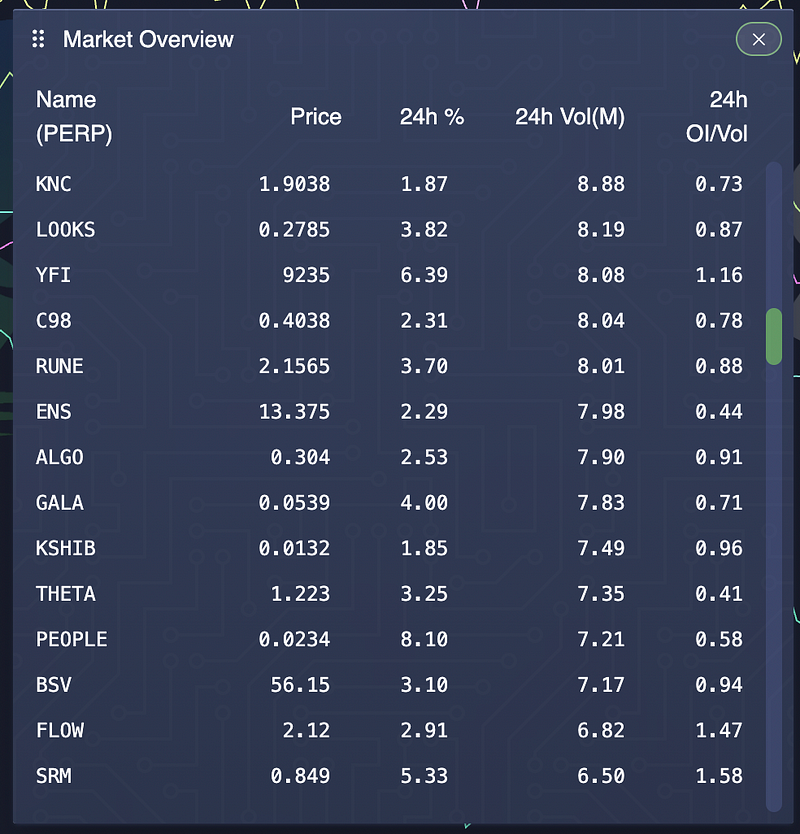
Market Overview: Quickly screen and sort markets by Volume, 24h % change and OI/Vol
Flow Rotation Panel: See where capital is rotating in real time. Which alts are trending? Where is money flowing? This is "what to trade?" intelligence that feeds directly into index construction.

Flow rotation: Where is the money flowing? What alts are trending?
Basket Plotter: Visualize how a custom basket of longs and shorts would have performed over recent history. Write in your components, see the chart. Save baskets and sync them directly to KF Index Manager for execution.


Sync to KF Index to quickly trade your custom basket
Composer: Pre-computed index templates sorted by Beta (correlation to BTC) and performance. Explore what happens when you long the top performers and short the bottom performers simultaneously. Tweak weights. Experiment. Save the best combinations.

Composer: Sort by Beta and % Change, tweak basket weights
Watchlist System: Save and load "baskets of indexes" for quick access to your favorite custom instruments.
Using BetaPlay for Index Discovery
Here is a workflow that many KF Index power users follow:
- Open BetaPlay and check the Flow Rotation panel. Which sectors are attracting capital?
- Use Markets screener to identify top performers by volume and 24h change over the latest 3 zigzag legs
- Build a candidate basket in Basket Plotter with longs (strong rotators) and shorts (weak laggards)
- Visualize the historical performance of the basket. Does it look like something you want to trade?
- Sync to KF Index with one click. The basket becomes a tradable index.
- Execute via KF Index manager with your chosen size and direction.
This workflow turns abstract market observations into concrete, executable positions in minutes.
Community Indexes on KF Bazar
Not everyone wants to build indexes from scratch. The Kingfisher Bazar hosts community-created indexes that you can browse, copy, and modify:
Popular community index types:
- Momentum rotation indexes: Systematically long recent winners, short recent losers
- Sector pair trades: Long one crypto sector, short another (L1 vs DeFi, Gaming vs AI, etc.)
- Volatility-normalized indexes: Equal-volatility weighting so no single component dominates risk
- Correlation hedge indexes: Designed to have near-zero correlation to BTC for true alpha generation
When browsing community indexes, evaluate them on:
- Logic: Does the thesis make sense to you?
- Historical performance: How did the backtested chart look?
- Risk characteristics: What is the max drawdown? Volatility?
- Component quality: Are the components liquid enough to trade?
- Creator reputation: Has the creator published other useful tools/templates?
Risk Management for Index Trading
Trading custom indexes introduces risks beyond single-asset trading:
Leg risk: Each component can move against you independently. A well-constructed index might have 4 winning legs and 1 disastrous leg that drags the whole index negative. Monitor individual leg P&L, not just aggregate index P&L.
Correlation risk: Components you thought were uncorrelated may suddenly correlate during market stress (crash = everything dumps together). Stress-test your index by checking how it performed during previous drawdown periods.
Execution risk: Multi-leg orders take longer to fill and are subject to slippage on each leg. During volatile markets, later legs may fill at significantly worse prices than earlier ones. Consider using limit orders or TWAP execution for large indexes.
Rebalancing risk: As components drift from target weights, your index exposure shifts. Decide on a rebalancing schedule (daily, weekly, or threshold-based) and stick to it. Letting weights drift unchecked means you are no longer trading your original thesis.
Size appropriately: A good rule of thumb is to trade custom indexes at 50-70% of the size you would use for a single-asset trade with similar conviction. The complexity and multi-leg nature warrant smaller sizing until you are comfortable with how indexes behave in your portfolio.
Getting Started Today
Ready to build your first index? Here is the fastest path:
- Log into thekingfisher.io (subscription required for KF Index)
- Open KF Index Manager and click "New Index"
- Start simple: create a 2-asset index (e.g. 70% BTC long / 30% ETH long) just to learn the mechanics
- Preview the historical chart. See how it would have performed.
- Connect your API key when ready to trade
- Once comfortable with basics, install BetaPlay from the Bazar for advanced discovery tools
- Build your first genuine thesis-driven index
- Start small. Paper trade first if possible. Scale up as you gain experience.
The KF Index tool turns you from a passive taker of whatever instruments exchanges offer into an active designer of your own trading vehicles. In a market where edge is everything, that customization advantage matters more than most traders realize.
Start building your own indexes today, explore Kingfisher features or view subscription plans.
Related reading: For managing the risk of your index positions, explore our position size calculator, understand the liquidation environment your index components sit within, or check open interest analysis for understanding leverage dynamics across your basket.
Related Articles
- Leverage Trading Crypto: Complete Guide to Safe Leveraged Trading
- Position Size Calculator: The Key to Consistent Risk Management
- Long vs Short Ratio: How to Interpret Positioning Data
- Altcoin Trading Strategies for Bull and Bear Markets
FAQ
Q: What's the minimum number of assets needed to create a meaningful custom index? A: Two assets is the functional minimum (e.g. 70% BTC / 30% ETH "market index" or BTC long / ETH short "pair trade index"). Two-asset indexes are perfect for learning the mechanics without complexity. Three to five assets is the sweet spot for most thesis-driven indexes (e.g. L1 rotation index: weighted basket of ETH/SOL/AVAX/DOT). Beyond ten components, you're running a mini-fund rather than a trading instrument, execution complexity, rebalancing costs, and correlation risk all increase nonlinearly. Start simple (2-3 assets), prove the concept works, then expand.
Q: Do I need programming skills to build and trade KF Index instruments? A: No programming required for basic index creation. The KF Index Manager UI lets you define components, weights, and rebalancing rules through a visual interface. Click to add assets, drag to adjust weights, preview historical performance charts, and sync to tradable index, all without code. Advanced users CAN access the Index API for programmatic creation, backtesting, and automated rebalancing, but it's optional. The Bazaar marketplace also hosts pre-built index templates you can copy and modify. If you can work through the Kingfisher dashboard, you can build a custom index.
Q: How is trading a custom index different from trading the individual components separately? A: Three key differences: (1) Single execution, one order executes all legs simultaneously (or near-simultaneously) versus managing multiple individual positions with staggered fills and accumulated slippage. (2) Defined risk/reward. The index has aggregate P&L, drawdown, and correlation characteristics you can analyze as a unit rather than trying to mentally track how five separate positions interact. (3) Thesis encapsulation, the index embodies a specific view ("L1s will outperform BTC") in a single tradeable instrument. Trading components separately invites deviation from the thesis ("well, SOL looks weak today, let me skip that leg"). The index enforces discipline by bundling the thesis into one decision.
Q: What are the risks specific to custom index trading that don't apply to single-asset trades? A: Four unique risks: Leg risk, one component catastrophically drags down the entire index (a -40% leg in a 5-asset equal-weight index = -8% even if others are flat). Correlation breakdown, components you selected for low correlation suddenly correlate perfectly during market crashes (everything dumps together, diversification vanishes). Rebalancing drift, winners grow beyond target weight, losers shrink, and your index morphs into something different than intended without you noticing. Execution risk, multi-leg orders fill at different times/prices during volatile markets; later legs may fill much worse than earlier ones. Mitigation: size indexes at 50-70% of single-asset equivalent, set automatic rebalancing thresholds, and monitor individual leg P&L alongside aggregate index performance.
Q: Can I share or sell indexes I create on the KF Bazaar? A: Yes, the Bazaar is Kingfisher's marketplace for community-created indexes, templates, and tools. You can publish your index with a description, performance history, and usage instructions. Other users can browse, copy, and subscribe to your index. Popular index creators build reputation within the KF community and some have attracted followers who auto-sync to their published indexes. There's no direct monetization (you don't earn per-copy revenue), but building a following creates opportunities: collaboration offers, consulting requests, community recognition, and early access to beta features for top contributors. The Bazaar rewards useful contributions with visibility, not direct payments.
Do not trade the market everyone else sees. Build the instrument that matches the market YOU see.