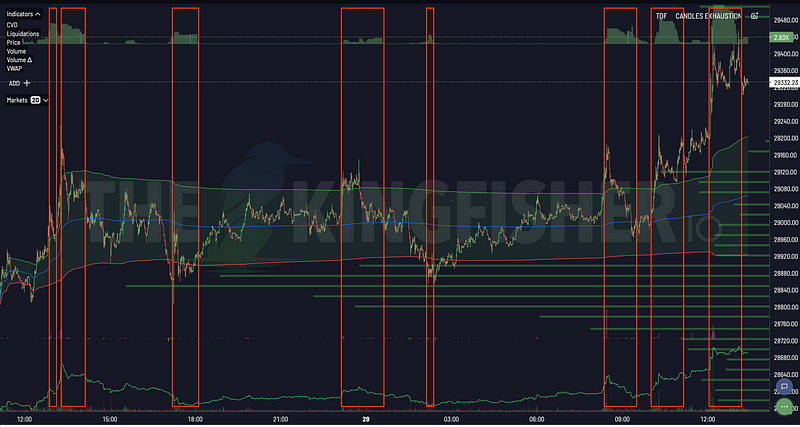


Kingfisher Liquidation heatmap visualization showing market leverage clusters with color-coded buy and sell walls indicating potential price targets

kingfisher pricing

Kingfisher Pricing: 2026 Plans & Features Comparison

Kingfisher pricing explained: how the access tiers differ, what each one unlocks, and how to pick the plan that fits the way you actually trade.

Published ⏱ 9 min readkingfisher pricingcrypto data costsanalytics platform priceGEX+ costliquidation map feessubscription tiers

Data Costs Money. Bad Data Costs More.

Let's cut to the chase. Kingfisher is a data and analytics platform, not a broker and not an exchange. We don't execute trades or hold your funds. We give you the information you need to make your own decisions on whatever exchange you use.

The access model has a few layers, so you only pay for the workspace you actually use, whether you're focused on liquidation maps, GEX+ dealer positioning, or building automated strategies with the API.

A note on prices: as of 2026-10-09, the workspace lists Premium at $79/month and Pro at $109/month, with annual billing lowering the effective monthly rate. Plan names, inclusions and rates change over time, so treat the app as the source of truth and verify current plans in-app at app.thekingfisher.io before you subscribe.


The Three Tiers

TierHeadlineListed rate (as of 2026-10-09)Who It's For
Free accessPublic preview$0Learning the platform, testing the waters
PremiumCore workspace$79/monthActive traders who need live data
ProBroader workflow$109/monthTraders who need aggregated and multi-coin views

Beyond the recurring tiers there is also pay-as-you-go session credit and dedicated API tiers for programmatic data. No hidden fees, no surprise charges, and you can cancel whenever you like.


Free Access

What you get:

  • The public site: product guides, educational resources and calculators
  • Selected delayed or non-live product examples
  • Access to community channels

What you don't get:

  • Live market data
  • GEX+ (Gamma Exposure)
  • Aggregated multi-exchange views
  • API access
  • Custom alerts

Best for: Complete beginners who want to learn the interface before committing. You can understand what a liquidation map looks like, how clusters work, and whether this type of analysis fits your trading style, all without paying anything.

Not for: Anyone actively trading with real money. The preview is not built for live execution.


Premium Tier

The core workspace for an active research routine: the main analytical toolkit without the Pro-only aggregated and multi-coin views.

What you get:

Liquidation Maps (Full)

  • Multi-exchange coverage across supported venues
  • Live updates on the assets your plan covers
  • Multiple timeframes: 1H, 4H, 1D, 1W
  • OI overlay for cluster validation
  • A history window that depends on your plan

GEX+ (Gamma Exposure), Included

  • Options dealer positioning data
  • Strike-level granularity
  • Flip level identification
  • Historical views where your plan includes them
  • GEX+ shows where dealer hedging may bite. Read it alongside the liquidation map, not instead of it.

Open Interest & Funding

  • OI tracking across supported exchanges
  • Exchange-specific breakdowns
  • OI versus price divergence detection
  • Multi-exchange funding rate comparison
  • Annualized yield calculations

API Access

  • Dedicated API tiers for programmatic data
  • Liquidation-map, aggregated-map, GEX and Toxic Order Flow endpoints
  • A credit allowance that depends on your tier
  • Enough for personal automation and light integration

Alerts

  • Email notifications
  • Price alerts
  • Cluster proximity alerts
  • Funding extreme alerts
  • GEX flip alerts

Who Premium is for:

  • Day traders needing live cluster data
  • Swing traders planning setups around major levels
  • Anyone who wants options positioning in the same workspace

Who Premium is NOT for:

  • Casual traders checking in once a week
  • Anyone who needs the aggregated and multi-coin scanning workflow (see Pro)

Pro Tier

Everything in Premium, plus the wider workflows for full-time and algorithmic traders.

What you get (everything in Premium plus):

Wider API and Streaming

  • Higher API credit allowances than the entry tier
  • Streaming access where your tier provides it
  • Production-ready for the trading bots you run
  • Credit, instrument and history controls in the API dashboard

Extended History

  • Longer or unlimited history depending on the API tier
  • Backtest strategies across the periods your tier supports
  • Review past liquidation cascades
  • Study how the GEX+ profile evolved over months

Additional Analytics

  • Extra metrics beyond the core workspace tools
  • Coverage and availability depend on your tier
  • Read the in-app plan page for the current list

Priority Support

  • Faster response times than the entry tier
  • Support channels shown in the app
  • When something breaks during a live session, speed matters

Who Pro is for:

  • Full-time professional traders
  • Algorithmic traders running bots
  • Small fund managers
  • Anyone who needs the widest history or streaming access

The Math: Does It Pay for Itself?

Be concrete, because vague ROI claims are useless.

Scenario: Swing Trader with $25K Account

You take a handful of trades each month. The cost of the subscription is fixed and known. The value depends entirely on whether the data changes your decisions: fewer entries inside a cluster you could not see, fewer stops placed where the market has obvious fuel, fewer positions held through a regime change you now understand. Each avoided mistake is a saving on fees, slippage and realised loss.

Frame it as a decision rule. If the data reliably stops you taking one poorly-placed trade a month, the subscription cost is easy to justify. If it never changes what you do, it is an expense you can skip. You can estimate your own figures from your trade log, which is more honest than any number on this page.

Scenario: Day Trader with $10K Account

Twenty trades a month, with stops and entries that now reference clusters instead of guesswork. The honest way to measure this is not a claimed win rate but your own record before and after: fewer stops clipped inside cluster zones, fewer entries chasing a move that had already run.

Track it yourself. If the change shows up in your log, the cost makes sense. If it does not, the answer is clear.

The Honest Take

If you're not actively trading, the free preview is fine. Learn the tools. Paper trade. Build confidence.

If you're putting real money into crypto perps, the question is not only what the subscription costs. It is whether the structure you are trading from is one you understand.


Plan Comparison Matrix

FeatureFree accessPremiumPro
AssetsPublic preview examplesAssets covered by planAssets covered by plan
Liquidation MapsDelayed / sample onlyFull, multi-exchange, liveFull, plus aggregated and multi-coin
GEX+❌✅✅
TOF / CVD❌✅✅
Open Interest❌Full, multi-exchangeFull, multi-exchange
Funding Rates❌Multi-exchangeMulti-exchange plus extra analytics
Historical DataNonePlan-dependent windowExtended / unlimited by tier
API AccessNoneCredit allowanceWider credits and streaming
AlertsNoneEmailEmail plus extra channels
SupportCommunity onlyEmailPriority channels

Payment Details

Accepted methods and billing options are shown at checkout in the app, along with the current price for each plan.

Billing cycles: monthly and annual options are available where offered, with annual billing usually carrying a lower effective monthly rate.

Current terms: refund windows, trial offers and promotional periods change, so check the in-app checkout for the terms in force today. For the best way to evaluate the platform before subscribing, see the guide to making the most of an evaluation.


Which Tier Should You Pick?

Pick Free access if:

  • You're new to crypto derivatives
  • You want to learn what liquidation maps are before paying
  • You trade casually, a few times a month at most
  • You're evaluating whether this type of analytics fits your trading

Pick Premium if:

  • You trade regularly, weekly or more often
  • You need live data rather than delayed previews
  • You want GEX+ in your workspace
  • You use multi-exchange data for venue selection
  • You want a starting API credit allowance for light automation

Pick Pro if:

  • Trading is your full-time job
  • You run algorithmic or bot strategies needing streaming
  • You need extended history for backtesting
  • Response time matters when something breaks
  • You're managing capital where the difference in tier cost is small next to your workflow needs

Upgrade Path

Start on the free preview. No pressure. Learn the interface. Pull some maps. Understand what you're looking at.

When you're ready for live data, open the plan page in the app and choose the tier that matches your workflow. Use every feature the tier includes. If it doesn't improve your trading, cancel. If it does, it stops feeling like a cost.

Moving between tiers is designed to be seamless. Your settings, alerts and history carry over.


FAQ

Q: Is the Premium plan worth it for a part-time trader with a smaller account? A: That depends on whether the data changes your decisions, not on a headline number. The right test is simple: over a month of using it, did the maps and flow readings stop you taking trades you would otherwise have taken, or help you hold through noise you would otherwise have mistaken for a breakdown? If yes, the cost is easy to justify. If you don't open the tools consistently, no plan is worth it, whatever the price.

Q: What's the difference between Premium and Pro beyond the price? A: Three things matter most: (1) API credits. Premium includes a starting allowance; Pro provides wider credits and streaming for live bots. (2) History. Premium gets a plan-dependent window; Pro extends it for deeper backtesting. (3) Analytics. Pro adds extra metrics and aggregation workflows. If you work from dashboards by hand, Premium covers the core toolkit. If you run bots or backtest seriously, Pro is the tier that fits.

Q: Does Kingfisher offer annual discounts? A: Annual billing is usually cheaper per month than monthly billing, and the exact saving is shown in the app at checkout. Because promotional periods change, the only figure worth trusting is the one on the current checkout page. Open the plan page in the app for today's terms.

Q: Can I downgrade or cancel anytime? A: Yes. There are no lock-in periods and no cancellation fees. Downgrading takes effect as described in the app, cancelling leaves your access running to the end of the current billing period, and re-subscribing later restores your settings. We deliberately keep this frictionless because locked-in subscriptions breed resentment. If the platform stops helping your trading, cancel.

Q: How does Kingfisher's pricing compare to competing crypto analytics platforms? A: Compare on the features that matter to your workflow rather than on a headline claim. Look at coverage across venues, whether options positioning is included, the API credit allowance, and the history window. Check each provider's current price and inclusions at the source, then decide whether the combination Kingfisher offers fits how you trade. That comparison, done on your own criteria, is more meaningful than any ranking written by either side.


Bottom Line

Kingfisher is best understood as a subscription to context, not a promise of profit. The LiqMap shows you where liquidity lives. GEX+ estimates dealer positioning. TOF exposes order flow. Together they give you a structural view of crypto derivatives markets that price-action charts alone cannot provide.

Free access to learn. Premium to trade with live data. Pro for the wider workflows.

Start with Kingfisher | See current plans in-app | Compare Features