

Toxic Order Flow: Detecting Market Manipulation in Crypto
You're Not Unlucky. You're Being Hunted.
You enter a long on $ETH. Price moves in your favor for exactly 47 seconds. Then it reverses -- hard, fast, no news, no reason you can find. You check Twitter, check the funding rate, check the order book. Nothing explains it.
That wasn't random market action. That was toxic order flow -- and someone with better information (or bigger pockets) just used your position as liquidity.
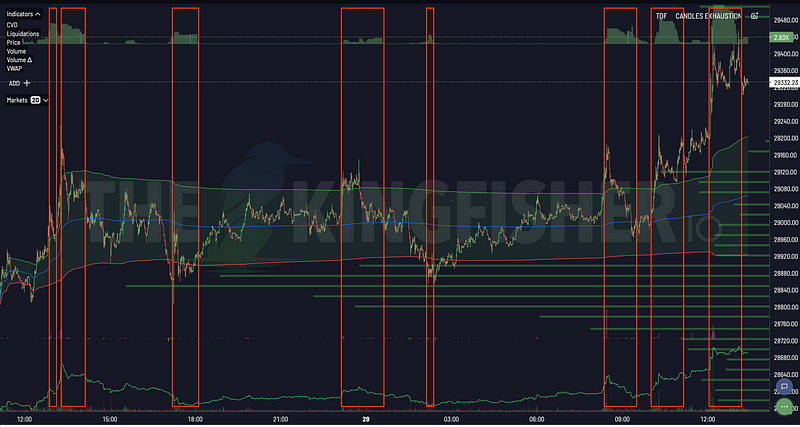
Toxic Order Flow (ToF) is Kingfisher's window into when informed traders -- market makers, whales, algorithmic desks -- are actively trading against uninformed participants. When ToF spikes, volatility follows. The only question is whether you're on the right side of it or the wrong side.
What Toxic Order Flow Actually Measures
The Core Concept
In every market, there are two types of participants:
Informed traders -- They have information advantages. Better data. Faster execution. Knowledge of where orders are clustered. They know things you don't.
Uninformed traders -- Retail. Trading on charts, gut feel, or CT sentiment. Providing liquidity without knowing who's taking the other side.
Toxic order flow measures the imbalance between these two groups. When a disproportionately large amount of trading volume comes from informed participants, toxicity spikes. And that spike is a leading indicator for volatility -- because informed trades tend to be right, and their execution moves price.
The Science Behind It: VPIN
ToF is built on VPIN (Volume-synchronized Probability of Informed Trading), developed by Easley, Prado, and O'Hara in 2012. Their research proved something crucial:
High VPIN = incoming volatility spike.
Not "might be." Is. The correlation between elevated VPIN and subsequent price volatility is one of the most robust findings in market microstructure literature. Kingfisher adapted this model specifically for crypto perp markets, where the toxic flow dynamics are even more pronounced because of 24/7 leverage availability.
Important note: VPIN absolute values are less important than comparing values to each other. A reading of 70 doesn't mean anything in isolation. But a jump from 25 to 70 in 15 minutes? That's your signal.
How Manipulation Shows Up in ToF
Technique #1: Stop Hunting (The Classic)
Here's how it works, step by step:
- Whales and algos identify where retail stop-losses cluster (usually at obvious technical levels -- round numbers, recent swing lows, major MAs)
- They push price toward those levels with aggressive sell orders
- Retail stops trigger en masse -- creating cascade selling
- The same whales/algos buy the panic dip at discounted prices
- Price recovers. Retail is shaken out. Smart money profits.
ToF signature: Toxicity spikes sharply as the push toward stops begins. Large sell orders detected below support levels. Rapid price movement through the level. Equally rapid reversal once stops clear.
The LiqMap tells you WHERE the stops are. ToF tells you WHEN someone is actively pushing toward them. Together, they tell you the full story.
Technique #2: Iceberg Accumulation
A whale wants to accumulate 1,000 $BTC without spooking the market. If they market-buy 1,000 BTC at once, price rockets and everyone notices.
Instead, they use iceberg orders -- showing only 10 BTC at a time on the order book. As each 10 BTC slice fills, another appears. Price stays "stable" while massive accumulation happens under the surface.
ToF signature: Persistent elevated toxicity as large hidden orders fill. Volume looks normal but ToF shows aggressive activity beneath the surface. Sudden directional move once accumulation completes and the whale pushes price in their direction.
Technique #3: Cross-Exchange Sweep
Algorithms spot tiny price differences between Binance and Bybit. They execute simultaneous buy/sell orders across venues. This creates an illusion of volume and interest that doesn't actually represent real directional conviction.
ToF signature: Toxicity spikes simultaneously across multiple exchanges. Price discrepancies that resolve instantly. Volume that appears but isn't actually tradeable by anyone else.
Reading ToF: The Practical Framework
Step 1: Identify the Spike
Look for:
- Sharp vertical increases in the ToF indicator
- Multiple spikes in quick succession (sustained manipulation)
- ToF rising while price consolidates (building phase)
Step 2: Check Context
Not all spikes are equal. Consider:
- Price location near liquidation clusters? Highly significant -- manipulation targeting fuel zones
- At key S/R levels? Significant -- classic stop-hunting territory
- During low-volume periods? More likely -- easier to manipulate thin markets
- Spreads widening? Confirming signal -- liquidity draining
Step 3: Time Your Response
ToF strategy depends on the situation:
Scenario A: ToF rising + price approaching cluster
- Don't fight it. Don't short the breakdown yet.
- Wait for ToF to DROP (manipulation ending)
- Enter reversal after toxicity normalizes
Scenario B: ToF already extreme (>70)
- Reduce position size or sit out
- Manipulation is active. Your edge is reduced.
- Watch for the flush + reversal setup
Scenario C: ToF low and steady (<30)
- Clean market conditions. Normal trading rules apply.
- Your standard setups have full edge here.
Real Trade Example: The $BTC Stop Hunt
Setup (March 2024):
- $BTC trading at $68,000
- Strong support at $67,500 (obvious technical level)
- LiqMap showed $400M+ in long liquidations clustered at $67,000-$67,500
- Retail longs with stops parked right at that support
ToF Readout:
- Toxicity baseline: 25 (normal)
- 15 minutes before breakdown: ToF climbed to 52
- At breakdown: ToF spiked to 78 (extreme)
- During cascade: ToF hit 85
What happened:
- Price pushed through $67,500 support (informed selling)
- Retail stops at $67,000 triggered ($400M+ long liqs)
- Cascade accelerated -- price touched $66,800
- ToF dropped from 85 to 32 in 20 minutes (manipulation complete)
- Price reversed to $69,000+
Traders watching ToF:
- Saw toxicity rise BEFORE breakdown → tightened stops or exited
- Saw extreme ToF during cascade → didn't short into it (knew it was a hunt)
- Saw ToF drop after flush → entered long on reversal confirmation
Traders not watching ToF:
- Stopped out at $67,000
- Saw "support broken," panic-sold or shorted
- Got wrecked on the reversal
- Provided the fuel AND the exit liquidity
ToF + LiqMap: The Combination That Matters Most
This is the highest-probability setup in Kingfisher's toolkit:
- LiqMap shows massive cluster at a key level (fuel identified)
- Price approaching that cluster (setup forming)
- ToF starts climbing as price gets close (hunters positioning)
- ToF spikes at the cluster (execution phase)
- ToF drops after cluster clears (hunt over, reversal loading)
Example:
- LiqMap: $600M short cluster at $48,000
- Current $BTC: $47,200, grinding up
- ToF rises from 28 → 55 → 72 as price approaches $48K
- Price hits $48K, shorts get swept, price rockets to $49,500
- ToF drops from 78 to 35
- Trade: Short the rejection at $49,500 (ToF confirmed hunt complete)
Without ToF, you see price hit $48K and think "breakout!" Without LiqMap, you see ToF spike but don't know the target. Together, they give you the what (clusters), the when (ToF timing), and the why (manipulation mechanics).
ToF + GEX+: Dealer Positioning Context
Add a third layer:
Negative GEX (dealers short gamma) + High ToF = Maximum danger zone.
Dealers short gamma means they MUST sell into rallies and buy into dips to hedge. When ToF also spikes (informed trading active), dealers are likely hedging aggressively into retail order flow. Volatility gets amplified in both directions.
Positive GEX (dealers long gamma) + High ToF = Suppressed volatility trap.
Dealers want to buy dips and sell rips. When ToF spikes in this environment, it might mean dealers are absorbing aggressive retail flow. Price might not move much despite high toxicity -- until it does, and then the move can be violent as accumulated pressure releases.
Kingfisher Pro gives you both ToF and GEX+ in real-time. Elite adds historical data so you can backtest how these combinations have played out in past scenarios.
Common ToF Mistakes
Mistake 1: Trading Every ToF Spike
"ToF hit 75! Short now!"
No. ToF predicts volatility, not direction. It tells you something is happening -- not which way price will go. Use LiqMap for direction, ToF for timing. One without the other is a weak signal. Both together is an edge.
Mistake 2: Ignoring Exchange-Specific Readings
ToF colors differentiate between exchanges (Bybit vs Binance), NOT toxicity levels. You need to read the actual numerical value, not the color intensity.
If global ToF is 80 but Binance-specific ToF is 35, the manipulation might be concentrated elsewhere. Or Binance might lag. Either way, look at the numbers, not just the visual.
Mistake 3: Entering Too Early
ToF starts climbing and you think "I'll front-run the manipulation!"
Bad idea. ToF can stay elevated longer than your margin can survive. The hunt might take hours. You might get stopped out before the main event even begins.
Wait for ToF to DROP before entering the counter-trade. That's the signal the manipulation phase is completing. Entering during the spike is guessing. Entering after the drop is reacting to completed information.
Daily ToF Routine
Pre-Trade Checklist
Before any trade:
- Check current ToF level -- Normal (<40), elevated (40-65), or extreme (>65)?
- Check ToF trend -- Rising, falling, or stable?
- Check exchange-specific readings -- Is this global or venue-specific?
- Cross-reference LiqMap -- Are clusters nearby that explain the ToF activity?
Only enter if ToF < 50 (ideal) or falling from elevated levels.
During Trade
- ToF rising? Tighten stops. Something's happening you can't see.
- ToF stable/low? Let the trade work. Normal conditions.
- ToF extreme (>80)? Consider exiting. Manipulation risk too high.
Post-Trade Review
- Was ToF high when I entered? Should I have waited?
- Did ToF change during my trade? How did it affect price action?
- What ToF patterns led to my best trades recently? Repeat those.
FAQ
Q: What's the difference between Toxic Order Flow and regular volume analysis? A: Regular volume tells you HOW MUCH traded. Toxic Order Flow (ToF) tells you WHO traded and whether their intent was aggressive (market orders consuming liquidity) or passive (limit orders providing liquidity). A volume spike could be two whales crossing a large block passively -- high volume, zero toxicity. Or it could be one whale aggressively sweeping the order book -- same volume, maximum toxicity. ToF captures the aggression component that volume alone completely misses. VPIN (Volume-Synchronized Probability of Informed Trading) scores above 70 typically precede significant price moves within 1-5 candles.
Q: What ToF reading should make me concerned about a potential manipulation or stop hunt? A: Readings above 70 on Kingfisher's ToF scale warrant immediate attention. 50-65 is elevated but normal during volatile sessions. Above 80 means aggressive order flow is dominating -- likely stop hunting, iceberg absorption, or coordinated positioning by large players. The key isn't the absolute number but the DEVIATION from baseline for that asset/timeframe. If BTC normally trades at ToF 25-35 and suddenly spikes to 75, something's happening. If SOL regularly hits 60 due to thin order books, 75 is less meaningful. Know your asset's baseline.
Q: How does ToF combine with Liquidation Maps for better entries? A: They answer complementary questions. LiqMap shows WHERE the fuel is stacked (price levels with concentrated liquidations). ToF shows WHETHER someone is actively pushing toward those levels right now. The highest-probability setup: price approaching a major cluster on LiqMap AND ToF spiking in the direction of that cluster. That means aggressive flow is pushing toward liquidation fuel -- cascade or squeeze is loading. Conversely, if price is near a cluster but ToF is flat/low, the fuel exists but nobody's lighting the match yet. Wait for ToF confirmation before entering.
Q: Can I use ToF data for altcoin trading or is it only reliable for Bitcoin? A: ToF is most reliable on BTC and ETH where order book depth makes the signal-to-noise ratio favorable. On major alts (top 20 market cap), ToF readings are useful but expect more false signals due to thinner liquidity -- a single whale moving $2M can spike ToF on a mid-cap alt in ways that don't predictably lead to moves. Below top-30, treat ToF as suggestive context rather than actionable signal. The pattern holds across all assets (aggressive flow precedes moves) but reliability degrades with liquidity.
Q: What's the single most valuable thing ToF has taught experienced traders? A: That many of their losing trades had elevated ToF at entry -- they were entering AGAINST aggressive flow without knowing it. Retrospective analysis consistently shows: when you enter long and ToF is aggressively selling (or vice versa), your win rate on that trade drops significantly regardless of how good your technical setup looks. Adding a simple rule -- "don't enter when ToF > 60 against your direction" -- to existing strategies has improved win rates by 3-8 percentage points across thousands of logged trades. It's the easiest edge most traders aren't using.
Bottom Line
Toxic order flow is the invisible hand that moves markets when no one's looking. Whales sweep stops. Market makers absorb flow. Algorithms front-run orders. All of it shows up in ToF before it shows up in price.
The question isn't whether manipulation exists -- it always does. The question is whether you can SEE it happening and position yourself accordingly instead of being the liquidity someone else sweeps.
ToF gives you eyes. LiqMap gives you targets. GEX+ gives you context. Together, they turn you from prey into predator.
Access Free Toxic Flow Widget — Explore Full Kingfisher Suite
Related Articles
Transform Your Crypto Strategy
Harness The Power of The Kingfisher's Comprehensive Market Intelligence!

Glossary
Learn key terms and concepts from our comprehensive crypto trading glossary.
Browse Glossary →Related Articles
Toxic Order Flow Bitcoin: Detect Market Manipulation in Real-Time
Stop being exit liquidity. Learn how toxic order flow (TOF) reveals when whales are hunting retail traders. Practical guide with step-by-step interpretation and trading strategies.

Getting Started on The Kingfisher: Stop Being Exit Liquidity
What problem does Kingfisher solve? See how liquidation maps reveal where price will go BEFORE it moves there. Stop getting hunted by whales. Start trading with an edge in 10 minutes.
How to Detect Crypto Market Manipulation in Real-Time
Stop being played by whales. Learn to spot crypto manipulation before it costs you money using Kingfisher's Toxic Order Flow and liquidation data. Real examples included.

Options Skew Templates for Perp Traders: Complete Guide to Using Skew Data on Kingfisher
Master options skew data for perpetual futures trading. Learn how to read and use Skew templates on Kingfisher, understand different template types (Basic, Vanilla, Premium), when each template works best, and how to combine skew analysis with LiqMap confirmation for high-probability crypto trading setups.