

How to Get Started with Kingfisher: Complete Beginner's Guide 2026
You're Here Because You're Tired of Being the Exit Liquidity
Let's be honest about why you're reading this. You've entered trades that looked perfect, got stopped out immediately, then watched price rocket in your original direction -- without you on board.
That's not bad luck. That's trading without information that's available to everyone else. Whales see liquidation clusters. Market makers see order flow. Dealers know their gamma exposure. You? You were looking at a RSI crossover on TradingView.
Kingfisher levels the playing field. This guide gets you from zero to reading your first liquidation map and understanding GEX+ in under 30 minutes.
Step 1: Create Your Account (30 seconds)
Go to thekingfisher.io/signup. Email, password, verify. No credit card required for the free tier.
Free tier gives you: $BTC, $ETH, $SOL with basic liquidation maps and delayed data. Enough to learn the interface and understand what you're looking at.
Pro ($79/month): All assets, real-time data, GEX+, API access, historical data. 14-day free trial when you're ready.
Elite ($109/month): Everything in Pro plus unlimited API/WebSocket, unlimited history, ML predictions. For full-timers.
Start free. Learn the water. Upgrade when you need real-time speed.
Step 2: The Dashboard Tour (3 minutes)
Left Sidebar -- Your Navigation
| Section | What It Does | Why It Matters |
|---|---|---|
| Dashboard | Market overview, current price, top clusters | Starting point every session |
| Liquidation Maps | Your primary tool | See where liq clusters live |
| GEX+ | Options dealer positioning (exclusive) | Invisible support/resistance |
| Open Interest | Total derivatives contracts by exchange | Market engagement & sentiment |
| Funding Rates | Perp funding across exchanges | Crowded trade detection |
| Long vs Short | Positioning ratio | Contrarian signals |
| Alerts | Custom notifications | Don't stare at screens |
| Settings | Account config, API keys | Set up once, forget |
Top Bar Controls
- Asset selector: $BTC, $ETH, $SOL, and 20+ more
- Timeframe: 1H / 4H / 1D / 1W -- match your trading style
- Exchange filter: All (aggregated), Binance, Bybit, OKX, dYdX
- Refresh: Manual data pull if needed
Step 3: Your First Liquidation Map Read (5 minutes)
This is the moment most traders realize they've been flying blind.
Navigate to: Liquidation Maps → Bitcoin
Here's what you're looking at:
The price line -- White line, current $BTC price, center of your screen.
Green zones below price -- These are long liquidation clusters. Real dollar amounts of leveraged long positions that will get force-sold if price drops to these levels. Bigger/darker zone = more money = bigger cascade potential.
Red zones above price -- Short liquidation clusters. Force-bought if price rises here. Think of these as magnets above current price.
Exchange selector (top left) -- "All" aggregates Binance + Bybit + OKX + dYdX. Or check individual exchanges to see where liquidity is concentrated.
Timeframe selector (top right) -- 1H for intraday, 4H for day trading, 1D for swing, 1W for position trades.
Reading Your First Map: A Concrete Example
$BTC at $67,000. You pull up the LiqMap:
ABOVE PRICE:
  $69,500: Large red zone -- $2.1B in short liquidations
  → Price wants to go here. Short squeeze target.

CURRENT PRICE: $67,000

BELOW PRICE:
  $64,000: Massive green zone -- $4.8B in long liquidations
  → Support level with consequences. Break below = cascade.
  $61,500: Medium green zone -- $1.3B in longs
  → Secondary support
What this tells you:
The path of least resistance right now is probably UP toward $69.5K (short cluster). There's solid support at $64K (long cluster) below. The range you're working with is roughly $64K-$69.5K.
If you're bullish: Look for entries near $64K (long cluster support). Target $69.5K (short cluster). Stop below $63.5K (below support invalidation).
If you're bearish: Wait for $64K to break with volume. If $4.8B in longs start cascading, next stop is $61.5K. Short the breakdown.
This isn't technical analysis. This is knowing where the actual money lives.
Step 4: Understanding GEX+ (7 minutes)
GEX+ is Kingfisher's exclusive product. No other retail analytics platform has it. It shows options dealer positioning -- where dealers are forced to hedge as price moves.
Navigate to: GEX+ → Bitcoin
What You're Seeing
The GEX profile curve -- Shows gamma exposure at each strike price along the X-axis.
Green areas (positive GEX): Dealers buy dips, sell rips here. Volatility gets suppressed. Price gets "stuck." Range-bound environment.
Red areas (negative GEX): Dealers sell rips, buy dips here. Volatility gets amplified. Explosive moves. Trending environment.
Flip level (marked on chart): The price where GEX flips from positive to negative. This is a regime change line. Everything behaves differently on each side.
Reading GEX+: Example
$BTC at $67,000. GEX+ shows:
Above $68,500: Negative GEX (-$420M/1%)
→ If price gets here, dealers amplify upward moves
→ Momentum zone

At $67,000 (current): Positive GEX (+$680M/1%)
→ Dealers buying dips here
→ Supportive environment

Below $65,000: Flips to Negative GEX
→ Below this line, regime changes
→ Momentum takes over from range behavior
Trading implication: Between $65K-$68.5K, expect range-bound behavior (positive GEX). Above $68.5K, expect momentum (negative GEX). Plan accordingly.
Step 5: Open Interest Basics (3 minutes)
Navigate to: Open Interest → Bitcoin
Open Interest = total value of all active futures/derivatives contracts. It tells you whether new money is entering or leaving.
The three scenarios:
| Scenario | Meaning | Action |
|---|---|---|
| Price UP + OI UP | New buyers entering (strong trend) | Hold or add longs |
| Price UP + OI DOWN | Shorts covering (weak rally) | Take profits, prepare to exit |
| Price DOWN + OI UP | New shorts entering (strong downtrend) | Hold or add shorts |
Pro tip: Watch for divergences. Price making higher highs while OI makes lower highs = buyer exhaustion. Reversal loading. The OI chart on Kingfisher plots both lines together so you can spot these visually.
Step 6: Funding Rates -- The Crowd Meter (3 minutes)
Navigate to: Funding Rates → Bitcoin
Funding rate = payment between longs and shorts in perpetual futures, every 8 hours. It keeps perp prices pegged to spot.
Reading funding:
| Rate | Interpretation | Trade Implication |
|---|---|---|
| +0.01% to +0.03% | Normal bullish bias | Nothing extreme |
| +0.05%+ | Longs overcrowded | Contrarian short signal |
| -0.01% to -0.03% | Normal bearish bias | Nothing extreme |
| -0.05%+ | Shorts overcrowded | Contrarian long signal |
The carry play: Stable positive funding (~0.02%/8h = ~21.9% annualized) means you can long spot + short perp for market-neutral yield. Not exciting, but it compounds.
Step 7: Setting Up Your First Alerts (2 minutes)
Don't watch screens all day. Let KF hunt for you.
Navigate to: Alerts → Create New Alert
Best first alert: Cluster proximity.
- Asset: Bitcoin
- Trigger type: Within 1% of major cluster
- Minimum cluster size: $1B+
- Notification: Email
Why this matters: When price approaches a billion-dollar liquidation cluster, something is about to happen. Either price bounces off it (cluster acts as support/resistance) or sweeps through it (cascade trigger). Either way, you want to know.
Set up 2-3 alerts for different cluster sizes and distances. Layer them so you get early warning without alert fatigue.
Step 8: Your First Complete Workflow (Putting It Together)
Here's what a real trading session looks like using Kingfisher:
Morning analysis (10 minutes):
- Pull LiqMap for $BTC
- Current price: $67,000
- Major long cluster: $4.8B at $64,000
- Major short cluster: $2.1B at $69,500
- Verdict: Clear range defined by clusters
- Check GEX+
- Current: Positive GEX (+$680M/1%)
- Flip level: $68,500
- Verdict: Range environment confirmed. Dealers supporting dips.
- Check OI
- Trending up with price over past week
- Verdict: New money entering, not just short covering. Bullish engagement.
- Check funding
- +0.017% (moderate)
- Verdict: No overcrowding. Safe to enter long.
- Formulate thesis
- Bullish setup: Strong support at $64K (long cluster), dealer support (positive GEX), rising OI, reasonable funding
- Entry zone: $65,000-$65,500 (near cluster)
- Target: $69,500 (short cluster)
- Stop: $63,800 (below cluster)
- Risk/reward: ~1:4.6
- Set alerts
- "$BTC within 1% of $64,000" -- cluster test warning
- "$BTC crosses $68,500" -- GEX flip / target approach
- "$BTC drops below $63,800" -- stop loss hit
- Execute
- Limit order at $65,200
- Stop loss at $63,800
- Target 1: $68,500 (50% profit take at flip level)
- Target 2: $69,50 (remaining at short cluster)
- Monitor
- Check LiqMap daily -- clusters still there?
- Check GEX+ daily -- regime unchanged?
- Wait for alerts, don't micromanage
Step 9: Timeframe Guide
Day trader: Use 1H LiqMaps, real-time GEX+, TOF/CVD for timing. Set intraday alerts. Focus on $1B+ clusters only.
Swing trader: Use 4H or 1D LiqMaps, daily GEX+ trends. Set price-level alerts. Plan trades around weekly cluster structure.
Position trader: Use 1W LiqMaps, weekly GEX+ flips. Check in every few days. Focus on macro cluster levels ($5B+).
Common Beginner Mistakes
Trading every cluster you see. A $300M cluster on one exchange with thin OI is noise. Filter for size ($1B+), cross-exchange confirmation, and high OI density.
Ignoring TOF/CVD confirmation. Clusters tell you WHERE. TOF tells you WHEN and WITH CONVICTON. TOF spiking at a cluster means someone is positioning hard. Always confirm before entering.
No risk management because "the cluster will hold." Clusters are probabilities, not guarantees. Always use stop-loss orders. Never risk more than 1-2% per trade. Read our risk management guide for a full framework.
Analysis paralysis from too many tools. Start with just the LiqMap for two weeks. Add GEX+ when you're comfortable. Then OI/funding. Build incrementally.
Your Learning Path
Week 1: Create account, explore dashboard, read your first LiqMap, set basic alerts. Get comfortable with the interface.
Week 2: Learn GEX+ basics, understand OI interpretation, practice reading funding rates. Start paper trading based on KF data.
Week 3: Execute first small live trade using complete workflow. Track results. Note what worked.
Week 4: Review trade journal, refine alert settings, explore TOF/CVD if you haven't yet. Start building your personal playbook.
FAQ
Q: I just signed up -- what's the absolute first thing I should do? A: Open the Liquidation Map for Bitcoin. Don't touch any other tool yet. Just stare at the LiqMap for 10 minutes. Notice the green zones (long liquidations below price) and red zones (short liquidations above price). Notice the cluster sizes in billions. Notice where current price sits relative to those clusters. That single map contains more actionable information about market structure than 95% of Twitter threads and YouTube videos combined. Spend your entire first week on LiqMap mastery before touching GEX+, OI, or TOF. One tool understood deeply beats five tools understood shallowly.
Q: How long until I'm actually comfortable using all the main Kingfisher tools? A: Realistic timeline for most users: Week 1 -- LiqMap only (learn clusters, understand green/red zones, identify key levels). Week 2 -- Add GEX+ basics (understand positive vs negative gamma, find flip levels). Week 3 -- Add OI interpretation and funding rates (four scenarios, crowding detection). Week 4 -- Explore TOF/CVD (order flow aggression, manipulation detection). Month 2 -- Start combining tools (multi-signal confirmation framework). Month 3 -- Personal playbook development (which tools matter most for YOUR style). The users who try to learn everything in week 1 overwhelm themselves and quit. Sequential tool adoption is the proven path.
Q: Should I paper trade first or jump into small live trades during the learning phase? A: Do BOTH, sequentially. Weeks 1-2: pure paper trading (write down what you WOULD do, track what happened, review accuracy). Weeks 3-4: tiny live trades (0.5% risk max, $50-100 on a $10K account) using the complete workflow. The goal of these early live trades isn't profit -- it's building the HABIT of running your checklist before every entry. Paper trading teaches you what the tools show. Live trading (even tiny) teaches you how YOU react when real money is involved. Those are different skills and both need practice.
Q: Which Kingfisher plan should I start on as a beginner? A: Start on the Free tier, upgrade to Pro via the 14-day trial when you're ready for real-time data. Free tier gives you delayed LiqMaps (15-minute updates) which is fine for initial learning -- you're studying patterns, not executing precision entries. Once you understand cluster basics (usually day 5-7), activate the Pro trial for real-time data, GEX+, and full feature access. Skip Elite unless you're already running algorithms or know you'll need WebSocket API -- the extra cost isn't worth it during the learning phase. Upgrade paths are seamless (settings carry over).
Q: What's the #1 mistake new Kingfisher users make in their first week? A: Trying to use ALL tools simultaneously on day one. They open the dashboard, see LiqMap, GEX+, OI, Funding, TOF, V-charting, and six other widgets, feel overwhelmed, and either (a) quit entirely or (b) ignore everything except price charts (defeating the purpose). The fix is ruthlessly sequential learning: ONE tool per week, mastered before moving on. The user who spends two weeks doing nothing but reading BTC LiqMaps will be a better trader in month 3 than the user who skimmed all tools in three days and uses none of them properly.
Bottom Line
Kingfisher doesn't execute trades for you. It doesn't hold your funds. It's not an exchange or a broker. It's a data and analytics platform that shows you what's actually happening in crypto derivatives markets -- information that was previously available only to institutional desks.
The LiqMap shows where the fuel is stacked. GEX+ reveals where dealers must hedge. OI tracks market engagement. Funding exposes crowd extremes. Together, they give you a structural edge that price-action-only trading can't match.
Your first map read will change how you see markets. Guaranteed.
Create Free Account | Read About Toxic Order Flow | Join Telegram Community
Related Articles
Transform Your Crypto Strategy
Harness The Power of The Kingfisher's Comprehensive Market Intelligence!

Glossary
Learn key terms and concepts from our comprehensive crypto trading glossary.
Browse Glossary →Related Articles

Options Skew Templates for Perp Traders: Complete Guide to Using Skew Data on Kingfisher
Master options skew data for perpetual futures trading. Learn how to read and use Skew templates on Kingfisher, understand different template types (Basic, Vanilla, Premium), when each template works best, and how to combine skew analysis with LiqMap confirmation for high-probability crypto trading setups.
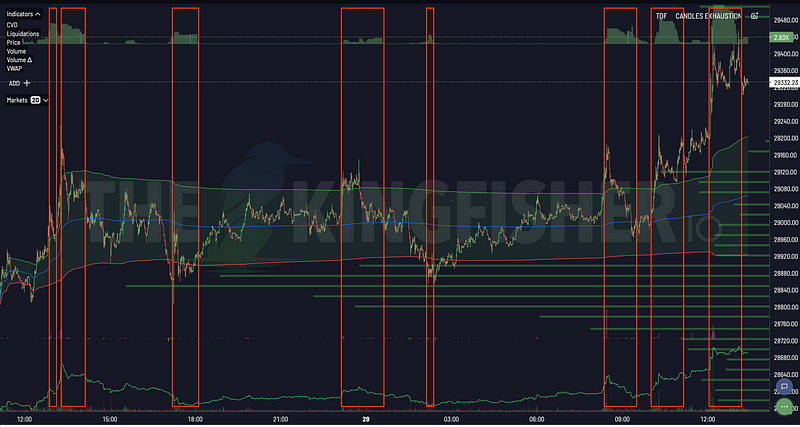
Toxic Order Flow Bitcoin: Detect Market Manipulation in Real-Time
Stop being exit liquidity. Learn how toxic order flow (TOF) reveals when whales are hunting retail traders. Practical guide with step-by-step interpretation and trading strategies.
How to Detect Crypto Market Manipulation in Real-Time
Stop being played by whales. Learn to spot crypto manipulation before it costs you money using Kingfisher's Toxic Order Flow and liquidation data. Real examples included.

Getting Started on The Kingfisher: Stop Being Exit Liquidity
What problem does Kingfisher solve? See how liquidation maps reveal where price will go BEFORE it moves there. Stop getting hunted by whales. Start trading with an edge in 10 minutes.